Alter News-Artikel!
» Hier geht's zur aktuellen Online-Hilfe
Article from
Quick Wins: Timesheet for Your Own Company, Numerous API Enhancements & Various Small Optimisations.
General
Each user sets their initial password
When adding a new user, MOCO sends an invitation via email to the person concerned. A password is no longer sent. It can be created via a link. Alternatively, go to "Reset Password" at login.
Access and evaluate internal projects more precisely
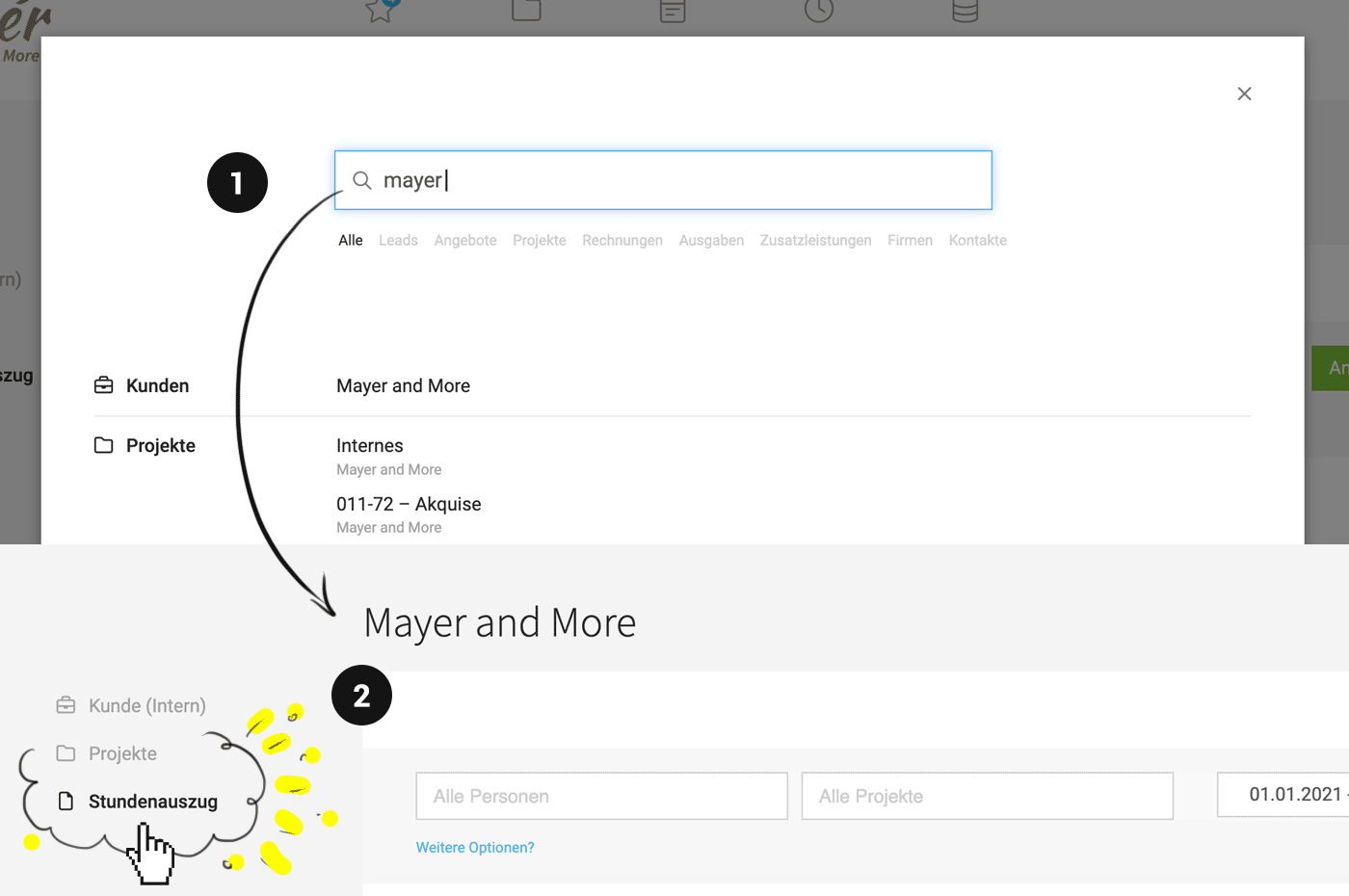
You can quickly access your company through the global search (1) – available via the magnifying glass at the top right or "/" on the keyboard. For your own company, you can now directly access active and archived projects through a sub-navigation (2). There is also a menu item "Timesheet". Here, recorded hours for your own company can be filtered and a timesheet (PDF, xls, csv) can be created.
 (English image not yet available)
Expanded adding teams to projects
When specifically adding teams, all already recorded ones can be deleted in the same step.
Extended Excel export for absences
In the Excel export for absences under "Planning", a column has been added indicating whether it is a half or full day.
Extended Excel export for proposals
In the Excel export of proposals, the proportion of offered (marked) additional services is now included as a column.
When adding a new user, MOCO sends an invitation via email to the person concerned. A password is no longer sent. It can be created via a link. Alternatively, go to "Reset Password" at login.
Access and evaluate internal projects more precisely
You can quickly access your company through the global search (1) – available via the magnifying glass at the top right or "/" on the keyboard. For your own company, you can now directly access active and archived projects through a sub-navigation (2). There is also a menu item "Timesheet". Here, recorded hours for your own company can be filtered and a timesheet (PDF, xls, csv) can be created.
(English image not yet available)Expanded adding teams to projects
When specifically adding teams, all already recorded ones can be deleted in the same step.
Extended Excel export for absences
In the Excel export for absences under "Planning", a column has been added indicating whether it is a half or full day.
Extended Excel export for proposals
In the Excel export of proposals, the proportion of offered (marked) additional services is now included as a column.
Time Tracking
Compare working hours with project hours per person
In the web view of personal working hours, you can compare the brief summaries of working time vs. project time by clicking on the day.
In the web view of personal working hours, you can compare the brief summaries of working time vs. project time by clicking on the day.
Expenditures & Accounting
Record transfers as batch payments
- You can choose batch payment as a preset
- The expected date of the batch payment is displayed when creating the transfer order.
Debtor and creditor accounts
The account management in the accounting area can now be sorted by name and account in ascending and descending order. This allows you to quickly determine what the last assigned number was.
OCR notification when budget limit is reached
When text recognition for incoming invoices is activated, a budget can be set. If this is reached, MOCO informs the account holder.
The account management in the accounting area can now be sorted by name and account in ascending and descending order. This allows you to quickly determine what the last assigned number was.
OCR notification when budget limit is reached
When text recognition for incoming invoices is activated, a budget can be set. If this is reached, MOCO informs the account holder.
API
Manage personal expenses (CRUD)
Personal expenses can now be read and written.
Manage expenditure payments (CRUD)
Expenditure payments can now be read and written.
Proposals: Send via email and filter by lead
Similar to the endpoint for invoices, proposals can now also be sent via email. Additionally, proposals can be filtered by lead.
Read and set project deputies
The second person on the project is now also readable and writable.
Selectable letterheads
Both when sending invoices and when retrieving the PDF, the letterhead is now selectable.
Filter additional services by labels
Cross-project additional services can now be filtered by project labels.
Text search for time entries and companies
Both time entries and companies can now be filtered via search terms.
Webhooks: New hooks for project tasks and subdomain header
Project tasks ("Tasks") are now also available as webhooks in the account settings. Additionally, the account subdomain is returned as an additional header.
Working hours: touch returns the entry
Instead of previously returning an empty response, the touch endpoint now returns the relevant entry.
Personal expenses can now be read and written.
Manage expenditure payments (CRUD)
Expenditure payments can now be read and written.
Proposals: Send via email and filter by lead
Similar to the endpoint for invoices, proposals can now also be sent via email. Additionally, proposals can be filtered by lead.
Read and set project deputies
The second person on the project is now also readable and writable.
Selectable letterheads
Both when sending invoices and when retrieving the PDF, the letterhead is now selectable.
Filter additional services by labels
Cross-project additional services can now be filtered by project labels.
Text search for time entries and companies
Both time entries and companies can now be filtered via search terms.
Webhooks: New hooks for project tasks and subdomain header
Project tasks ("Tasks") are now also available as webhooks in the account settings. Additionally, the account subdomain is returned as an additional header.
Working hours: touch returns the entry
Instead of previously returning an empty response, the touch endpoint now returns the relevant entry.








