Alter News-Artikel!
» Hier geht's zur aktuellen Online-Hilfe
Article from
Quick Wins: Predefined Client Discount, UX Enhancements & More.
 (English image not yet available)
New Features
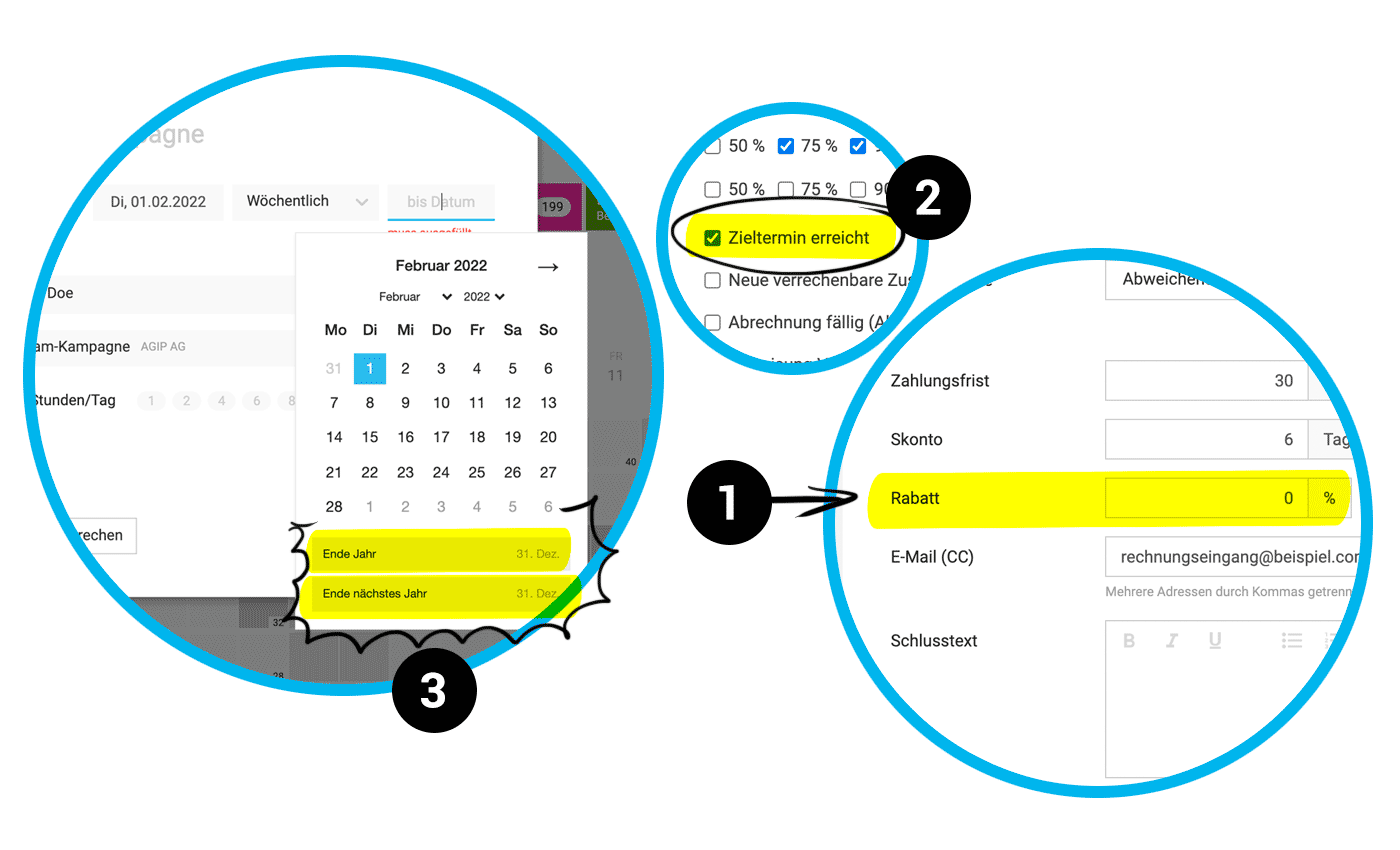
Predefined Client Discount (1)
The predefined overall discount is automatically applied to all proposals and invoices created for the client.
Notification for Project Deadline (2)
In the profile under "Notifications," you can now set whether MOCO should notify you on the project deadline.
Time Tracking Android App
The predefined overall discount is automatically applied to all proposals and invoices created for the client.
Notification for Project Deadline (2)
In the profile under "Notifications," you can now set whether MOCO should notify you on the project deadline.
Time Tracking Android App
- The Target-Actual progress bar for the week is now also displayed on Android.
- Check-In and Check-Out can be done by long-pressing the icon.
Exports
- The proposal export now includes an additional "Labels" column. A useful addition for various evaluation options.
- The project export now includes an additional "Lead ID" column.
- The timesheet now includes an additional "Modified on" column. This allows tracking if an entry was changed afterwards.
UX Enhancements
Faster Series Entry Until Year-End (3)
To quickly enter a project weekly until the end of the year, you can now simply select "End of Year" or "End of Next Year" with a quick selection.
Invoice Filtering Retained
When navigating back to the invoice list in the browser, you return to the last selected filtering.
Advance Invoice / Partial Invoice
In the proposal invoicing, the type "Advance Invoice" can also be selected to cover all cases. Please be sure to note the difference between partial invoices (invoicing of services) and advance invoices (invoice for a prepayment), as the designation also has tax implications.
When Creating a Client, the UID Input Field is Preferably Displayed (no longer under "More Options") so that the input is not forgotten. If the UID is entered, it is also displayed on the invoice.
Enlarged Document Preview
The document preview when hovering over the document icon in the list is now larger.
Extended Client Selection in Project Creation
When selecting a client, the client number is now also displayed (and can also be searched for).
Notification Inbox
To quickly enter a project weekly until the end of the year, you can now simply select "End of Year" or "End of Next Year" with a quick selection.
Invoice Filtering Retained
When navigating back to the invoice list in the browser, you return to the last selected filtering.
Advance Invoice / Partial Invoice
In the proposal invoicing, the type "Advance Invoice" can also be selected to cover all cases. Please be sure to note the difference between partial invoices (invoicing of services) and advance invoices (invoice for a prepayment), as the designation also has tax implications.
When Creating a Client, the UID Input Field is Preferably Displayed (no longer under "More Options") so that the input is not forgotten. If the UID is entered, it is also displayed on the invoice.
Enlarged Document Preview
The document preview when hovering over the document icon in the list is now larger.
Extended Client Selection in Project Creation
When selecting a client, the client number is now also displayed (and can also be searched for).
Notification Inbox
- Messages can be moved back from the archive to the inbox.
- The hover experience feels better.
Error Handling DATEV Unternehmen online
- Faulty documents (e.g., incorrect tax key) are now extracted from the accounting export. The DATEV error message is displayed in the list to make the necessary adjustment and start a new transmission.
- Incoming invoice documents with payment methods such as credit card, PayPal, cash, or direct debit are now transmitted to DUO with the status paid. This prevents a payment instruction from being accidentally created in DUO.
Optimized Invoice Approval
Incoming invoices can now also go through an approval process for a few months. The functionality has been slightly optimized:
- The colored border indicating the approval status has some spacing to better distinguish it from the potentially colored avatar.
- In the filterable view "Approval Pending," you can filter by your own approval requests using "Q."
- In the expenditures filter, you can also filter by "Approved Expenditures."
- It is recorded under "Notes & Files" when an approval request is deleted.
Personal Expenses Statements Grouped by Year
For better clarity, personal expenses statements are now grouped by year under "Personal" and in the profile.
For better clarity, personal expenses statements are now grouped by year under "Personal" and in the profile.








