Alter News-Artikel!
» Hier geht's zur aktuellen Online-Hilfe
Article from
Quick Wins: Labels for Personnel, Selectable Smart Filter, Shared Time Entry Display & More.
 (English image not yet available)
Personnel
Labeling/Filtering of Personnel
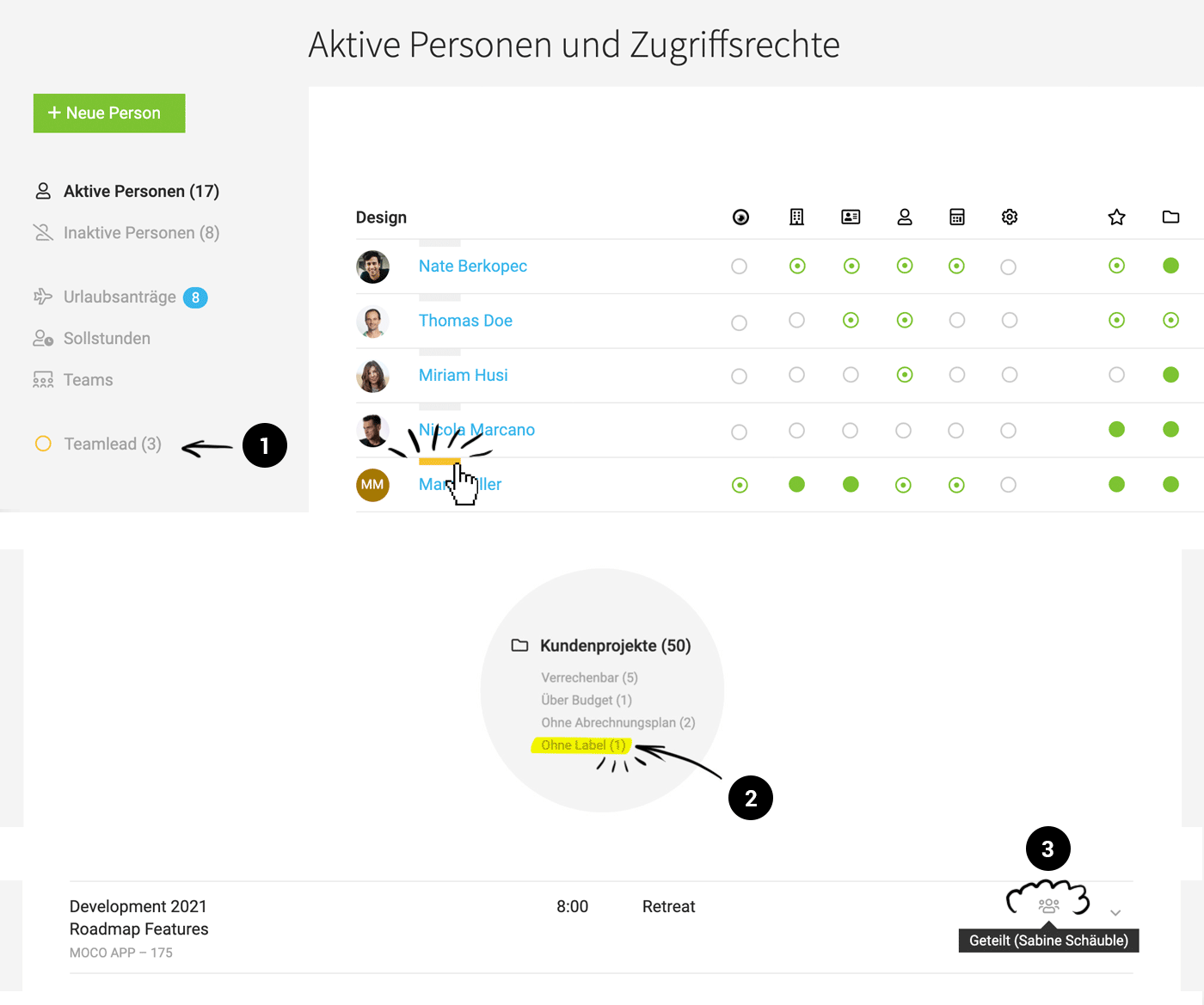
Employees and freelancers can now be labeled/categorized using labels (1). This allows for targeted filtering.
Employees and freelancers can now be labeled/categorized using labels (1). This allows for targeted filtering.
General
"No Label" Notification
If you want to be notified in various areas when objects are not labeled, you can now choose in your account (Settings > Account > Smart Filter) where you want a Smart Filter to be displayed (2). This allows for targeted filtering by relevant projects, invoices, etc.
If you want to be notified in various areas when objects are not labeled, you can now choose in your account (Settings > Account > Smart Filter) where you want a Smart Filter to be displayed (2). This allows for targeted filtering by relevant projects, invoices, etc.
✨ With the launch, for accounts with > 50 projects where less than 10% are not labeled, the Smart Filter for projects is automatically activated.
Create Contacts with Limited Rights
Similar to other areas, you can now also create contacts under "Contacts" with limited rights.
Create Contacts with Limited Rights
Similar to other areas, you can now also create contacts under "Contacts" with limited rights.
Time Tracking
Improved Traceability for Shared Time Entry
If a time entry is shared with colleagues (e.g., during a meeting), an info is displayed on the time entry (3) indicating that it is a shared entry and who shared it.
Mobile App: Long Press App Icon for Check-In/Check-Out (Time Tracking)
On iOS and Android, a long press on the app icon is now sufficient to check in and out for time tracking.
Mobile App Android: Target-Actual Progress Display for Each Week
Now also available on Android.
If a time entry is shared with colleagues (e.g., during a meeting), an info is displayed on the time entry (3) indicating that it is a shared entry and who shared it.
Mobile App: Long Press App Icon for Check-In/Check-Out (Time Tracking)
On iOS and Android, a long press on the app icon is now sufficient to check in and out for time tracking.
Mobile App Android: Target-Actual Progress Display for Each Week
Now also available on Android.
Projects
Project Groups
If projects are part of a project group, this is indicated in the project list.
Automatic Proposal Assignment
When creating projects from leads, existing proposals are directly assigned to the project, provided they are not already assigned to another project.
If projects are part of a project group, this is indicated in the project list.
Automatic Proposal Assignment
When creating projects from leads, existing proposals are directly assigned to the project, provided they are not already assigned to another project.








