Alter News-Artikel!
» Hier geht's zur aktuellen Online-Hilfe
Article from
Project Groups for Sub- & Partial Projects.
Large projects, such as budgets or campaigns, are typically divided into smaller sub-projects. In MOCO, sub-projects are treated as regular projects. These individual projects can be grouped into a project group.
The Project Group
A group is defined by an overall budget, a responsible person, and assigned projects. It enables:
- Monitoring of an overall budget in terms of progress and invoicing
- Targeted consolidated invoicing for the grouped projects
Creating Project Groups
1. Activate project groups in the settings under "Projects".
2. Under "Client Projects," the new navigation point "Project Groups" (1) will appear. Here, project groups can be created (2) and managed (3).
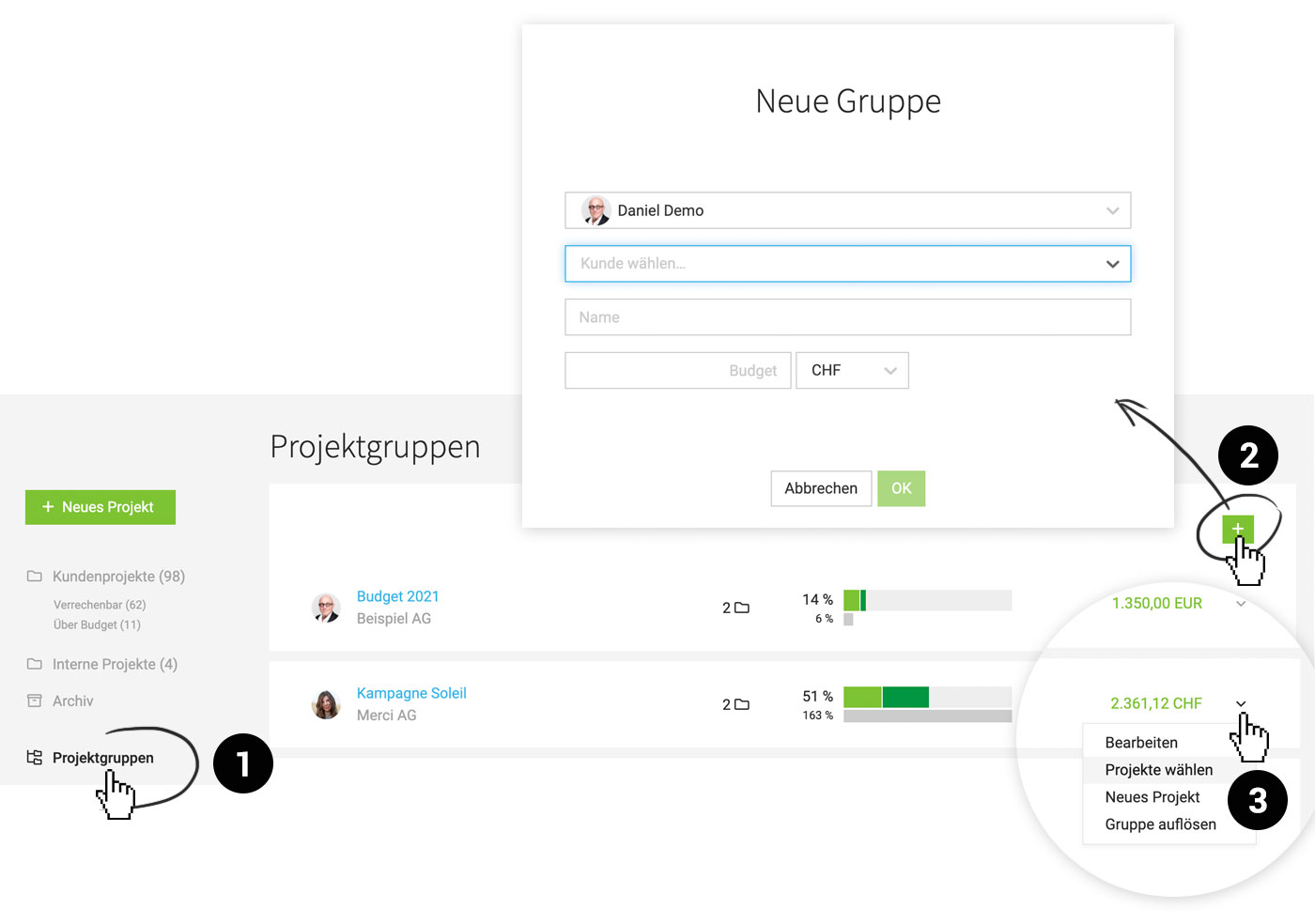 (English image not yet available)
A click on the group displays the assigned projects – a mouseover on the progress bar reveals details about progress and invoicing.
2. Under "Client Projects," the new navigation point "Project Groups" (1) will appear. Here, project groups can be created (2) and managed (3).
(English image not yet available)A click on the group displays the assigned projects – a mouseover on the progress bar reveals details about progress and invoicing.








