Trello: Collaboration + Time Tracking.

Bringing Strengths Together
Software that “does everything” usually does some things very well, and others not particularly well. That’s frustrating and unsatisfying. So why not combine the best tools, if you can do it neatly and within reason?
That’s what integrations are for. Combining MOCO and Trello lets you connect a first-class business tool focused on the numbers with a first-class project management and collaboration tool.
How It Works
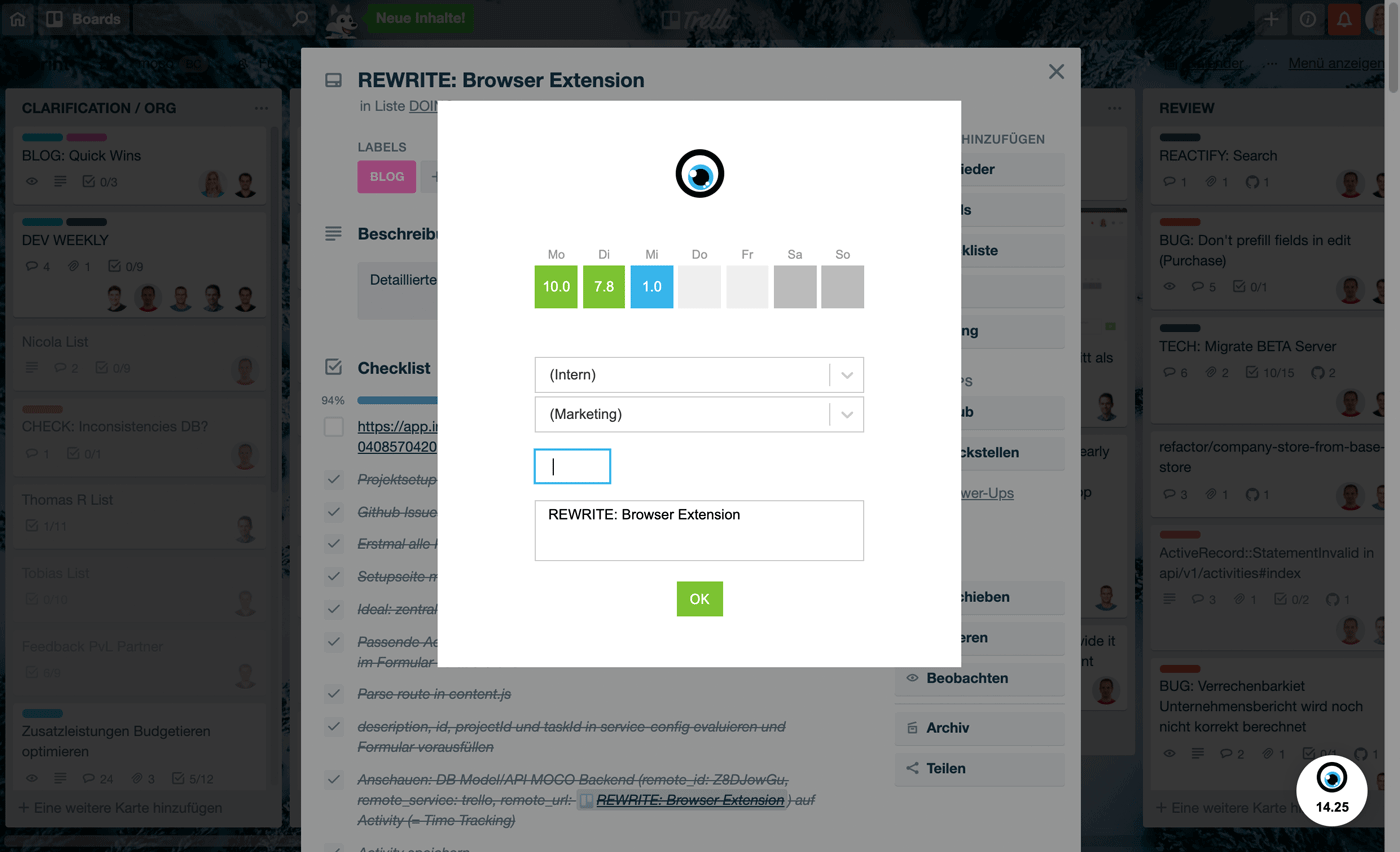
In a Trello task card, you can track time by clicking the MOCO eye (bottom right).
- Time entries are saved directly in your MOCO account and linked to the Trello ticket.
- The ticket ID is stored with the entry and is available, among other things, in the timesheet export.
Installation
How to install the extension for Chrome or Firefox.
Technical Requirements
Chrome or Firefox browser.
Possible Issues
The extension doesn’t work despite the correct personal API. In this case, you probably haven’t yet been added to a project as a time tracker, or no service has been set up that you can book time to.
More Ways to Use Trello + MOCO
Via
Zapier
Trello and MOCO can also work together in other areas.
Direct link to the overview of triggers and actions:
» https://zapier.com/apps/trello/integrations/moco








